• Skip to primary navigation
  • Skip to main content
  • Skip to footer
Giganews

Giganews

The World's Best Usenet Provider

  • Features
    • Why Giganews?
    • VyprVPN
    • Giganews Reviews
  • Support
    • Welcome Kit
    • Usenet Support
    • VyprVPN Support
    • Contact Support
  • Sign In
  • Sign Up

Search Results for: usenet

Posting to Newsgroups

Usenet University™ Topics

Overview
Usenet Basics
Accessing Newsgroups
Searching the List of Newsgroups
Finding Articles in a Specific Newsgroup
Finding Articles Across all Newsgroups
Posting to Newsgroups
The Giganews Accelerator
Switching Ports for Speed Optimization

Posting to Newsgroups

Learn how to post to newsgroups. Skip to 0:43 for the Microsoft outlook Express walkthrough, or skip to 1:21 for the NewsBin Pro walkthrough.


Get the best Usenet service in the world!

Start Free Trial

Finding Articles Across all Newsgroups

Usenet University™ Topics

Overview
Usenet Basics
Accessing Newsgroups
Searching the List of Newsgroups
Finding Articles in a Specific Newsgroup
Finding Articles Across all Newsgroups
Posting to Newsgroups
The Giganews Accelerator
Switching Ports for Speed Optimization

Finding Articles Across all Newsgroups

Learn how to conduct global searches. Skip to 0:48 for the NewsBin Pro walkthrough.

Get the best Usenet service in the world!

Start Free Trial

Finding Articles in a Specific Newsgroup

Usenet University™ Topics

Overview
Usenet Basics
Accessing Newsgroups
Searching the List of Newsgroups
Finding Articles in a Specific Newsgroup
Finding Articles Across all Newsgroups
Posting to Newsgroups
The Giganews Accelerator
Switching Ports for Speed Optimization

Finding Articles in a Specific Newsgroup

Learn how to search newsgroups for articles.

Get the best Usenet service in the world!

Start Free Trial

Searching the List of Newsgroups

Usenet University™ Topics

Overview
Usenet Basics
Accessing Newsgroups
Searching the List of Newsgroups
Finding Articles in a Specific Newsgroup
Finding Articles Across all Newsgroups
Posting to Newsgroups
The Giganews Accelerator
Switching Ports for Speed Optimization

Searching the List of Newsgroups

Learn about newsgroups and how to find and subscribe to them.

Get the best Usenet service in the world!

Start Free Trial

Accessing Newsgroups

Usenet University™ Topics

Overview
Usenet Basics
Accessing Newsgroups
Searching the List of Newsgroups
Finding Articles in a Specific Newsgroup
Finding Articles Across all Newsgroups
Posting to Newsgroups
The Giganews Accelerator
Switching Ports for Speed Optimization

Accessing Newsgroups

Learn how to access newsgroups and configure two popular newsgroup clients.

Get the best Usenet service in the world!

Start Free Trial

Why do I need a VPN?

VyprVPN logo

A Personal Encrypted VPN for your entire Internet Connection

Why do I need a VPN?


Defeat Deep Packet Inspection

ISPs commonly use Deep Packet Inspection to inspect your Internet traffic and limit your Internet speed, including Usenet speeds, based on the profile of your Internet usage. VyprVPN defeats Deep Packet Inspection.

Secure Your Entire Internet Connection

VyprVPN secures all your online activity, not just Usenet. Hackers and botnets scan the Internet for unprotected devices. VyprVPN uses end-to-end encryption to protect all your web browsing, DNS requests, chats, emails, financial transactions, web passwords and credit card numbers.

Security While on the Go

Golden Frog offers a variety of VPN protocol options with support for a wide array of devices. Secure your data and online activity whether you’re on a laptop, desktop computer, mobile device or tablet.

Use VPN security on any type of network, including:

  • Wi-Fi Hotspots
  • Cellular Networks
  • Private wired networks

Prevent Geo-Targeting

When you’re connected to VyprVPN, your IP address and location are replaced with a VyprVPN IP address. Prevent online marketers, search engines and websites from analyzing your IP address or location.

View Your Preferred Language and Currency

View the Internet in your native language while traveling or living abroad. Have the ability to see your preferred currency when you visit e-commerce sites.

Bypass Usenet Access Blocking

Some networks block access to Usenet. VyprVPN creates a secure tunnel to our servers, bypassing school and government Usenet connection blocks and corporate firewalls.

VPN Server Clusters Around the World

  • 700+ VPN Servers in Over 30 Countries
  • 300,000+ IPs (North America, South America, Europe, Asia, & Oceania)
  • Unlimited Server Switching & Speed

See All VyprVPN Server Locations »


VyprDNS™ – Encrypted, Zero Logging DNS

Internet users typically rely on their ISP’s DNS servers or a 3rd party DNS, which are often configured to comprehensively log your Internet activity and censor websites – even if you use a VPN.

VyprDNS is Golden Frog’s 100% owned and operated zero-logging DNS available for Giganews members with VyprVPN. Golden Frog developed VyprDNS to increase user privacy, prevent man-in-the-middle attacks and defeat censorship across the world. With VyprDNS your DNS requests pass through an encrypted tunnel and don’t rely on 3rd parties.

Learn how VyprDNS protects your privacy »


How does a VPN Work?

A VPN creates a secure Internet connection where your Internet Service Provider sees only encrypted data, and the final destination sees only your VyprVPN IP addresses and VyprVPN server location.

Without VyprVPN

Websites see:

  • Your IP
  • Your location

Your ISP sees:

  • The websites you are visiting
  • The videos you are watching
  • Who you e-mail
  • Who you instant message
  • Your downloads and uploads

With VyprVPN

Websites see:

  • VyprVPN IP
  • VyprVPN location

Your ISP sees:

  • Encrypted VyprVPN traffic
  • No website URLs, videos, e-mails, IMs or downloads

Download VyprVPN for your desktop, mobile device or router.

Get the best Usenet service in the world!

Start Free Trial

What is VyprVPN for Mobile?

VyprVPN logo

A Personal Encrypted VPN for your entire Internet Connection

VyprVPN for iOS

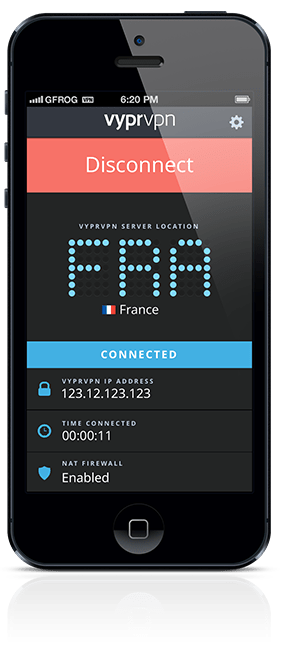
VyprVPN for iOS, is a vpn app that secures your Internet connection on your iPhone or iPad. Whether checking email, browsing the web or using iOS apps, VyprVPN encrypts your Internet connection to secure your personal information from hackers and data sniffers.

VyprVPN for iOS Features:

  • Manually connect or disconnect VyprVPN with a single swipe
  • Filter by region or country and add VPN servers to your favorites for easy access
  • Ping test the VyprVPN servers to find the fastest server
  • View your server location, throughput and IP address
  • Automatic reconnect option for dropped VPN connections

VyprVPN for Android

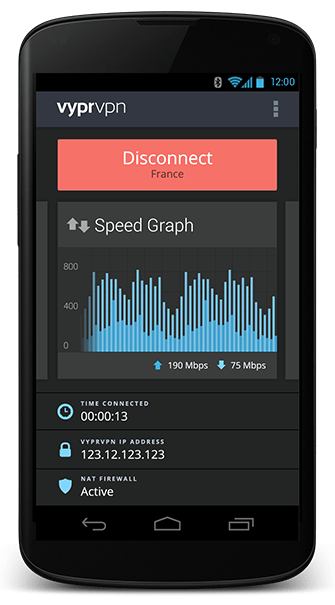
Connect to any of VyprVPN’s global server locations on your Android device and secure your mobile data over any Internet connection.

VyprVPN for Android Features:

  • Easily connect to VyprVPN with a single tap
  • Option to automatically connect to VyprVPN on Wi-Fi and Cellular networks
  • Filter by region or country and add VPN servers to your favorites for easy access
  • Use the VyprVPN speed graph to monitor your upload and download speeds
  • Automatically connect to the fastest VyprVPN server available
  • Ping test the VyprVPN servers to see the different speeds
  • Use widgets to quickly connect or disconnect from your home screen or lock screen (1×1 Widget & 4×1 Widget)
  • Swipe through the VyprVPN cards for quick access to the VyprVPN speed graph, server location map and connection log
  • View your server location, throughput and IP address
  • Automatic reconnect option for dropped VPN connections

Get the best Usenet service in the world!

Start Free Trial

What is VyprVPN for Mac?

VyprVPN logo

A Personal Encrypted VPN for your entire Internet Connection

What is VyprVPN for Mac?

VyprVPN for Mac automatically configures and simplifies managing your VyprVPN connections. Access VyprVPN from the Mac menu bar and switch freely between VyprVPN server locations worldwide with a single click.

Download VyprVPN for Mac

VyprVPN for Windows

Easy, One-Click Connect & Auto Connect

  • VyprVPN can automatically connect and encrypt your Internet traffic when you connect to an unknown Wi-Fi network
  • VyprVPN can even automatically connect whenever you open the app or when your system starts
  • If VyprVPN disconnects for any reason without you choosing to, the app can attempt to reconnect for you
  • Enabling VyprVPN Kill Switch will automatically block all Internet and network traffic when VyprVPN disconnects or is not enabled

Fast VPN Server Selection

  • Select “fastest server” to automatically connect to the fastest VyprVPN server available
  • Manually switch between 40+ server locations worldwide with a single click
  • Favorite specific servers for easy access

VyprVPN Speed Graph

Use the VyprVPN speed graph to monitor your connection speed. View your upload and download speeds with VyprVPN enabled or disabled.

VyprVPN Server Ping Test

Ping test the VyprVPN servers to find the fastest server. Simply run the test, and choose the fastest VPN server with the lowest ping time.

Easy Menu Bar Access

Connect and switch VyprVPN server locations, view your IP address and monitor connection speed from the Menu Bar.

Other Features

Automatic-Connect option on Wi-Fi and cellular networks

Receive desktop notifications when you connect, disconnect or change server locations

Automatically replaces security certificates for OpenVPN and L2TP

Option to automatically detect a lost VPN connection and prompt to reconnect

Automatic-Connect option on Wi-Fi and celluFast access to your recent server locations and VPN protocols

We’re constantly implementing additional new features!

Port selection will find open ports to defeat intentional port blocking or throttling

Receive automatic updates when new server locations are available

View the Changelog »

Get the best Usenet service in the world!

Start Free Trial
  • « Go to Previous Page
  • Go to page 1
  • Interim pages omitted …
  • Go to page 7
  • Go to page 8
  • Go to page 9
  • Go to page 10
  • Go to page 11
  • Interim pages omitted …
  • Go to page 20
  • Go to Next Page »

Footer

Giganews

  • Features
  • Plans
  • Giganews Reviews
  • Terms of Service
  • Outsourcing
  • Peering

About Us

  • Corporate
  • Legal Information
  • Privacy Policy
  • DMCA

Support

  • Support Overview
  • Contact Us
  • Facebook
  • Twitter
  • YouTube
  • English
  • Nederlands
  • Deutsch

Giganews® and the Giganews logo are registered trademarks of Giganews, Inc. © 2026 Giganews, Inc. United States